Making a Roblox game is an incredible journey that allows you to transform creative ideas into playable digital experiences for millions. Our deep dive exploration covers the essential tools like Roblox Studio and the Luau programming language which form the backbone of development. We analyze why the platform remains a top choice for aspiring developers due to its built in multiplayer infrastructure and monetization options. You will find detailed information about the developer exchange program known as DevEx which turns virtual currency into real world profit. This guide serves as a navigational roadmap for beginners and experts looking to master game design and community engagement in the United States gaming market. Stay ahead of the curve with our insights into the latest Roblox engine updates and social features that drive massive player retention today. Making your mark in the metaverse starts here with a solid foundation in mechanics and marketing.
How do I start making a Roblox game for beginners?
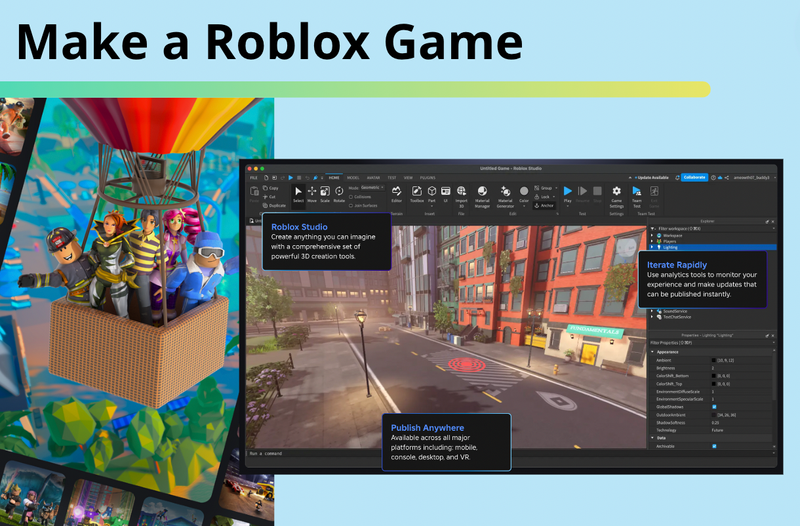
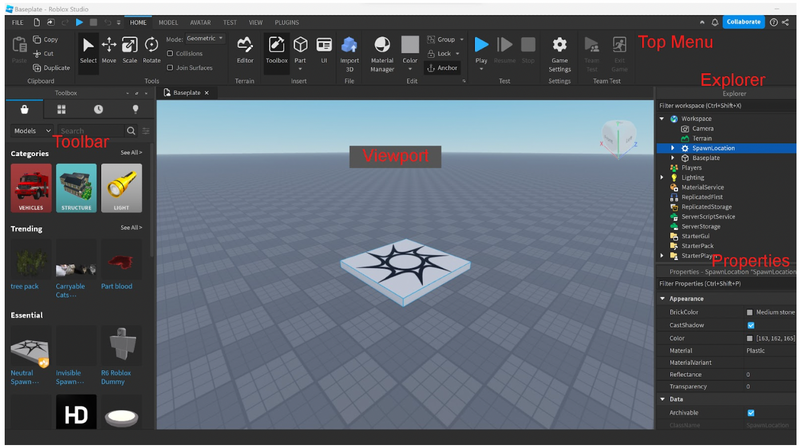
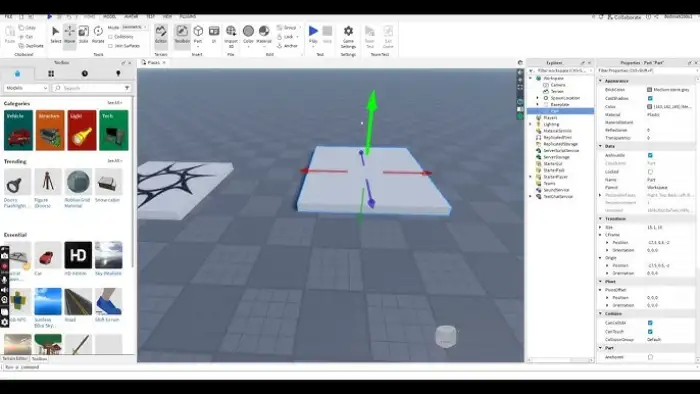
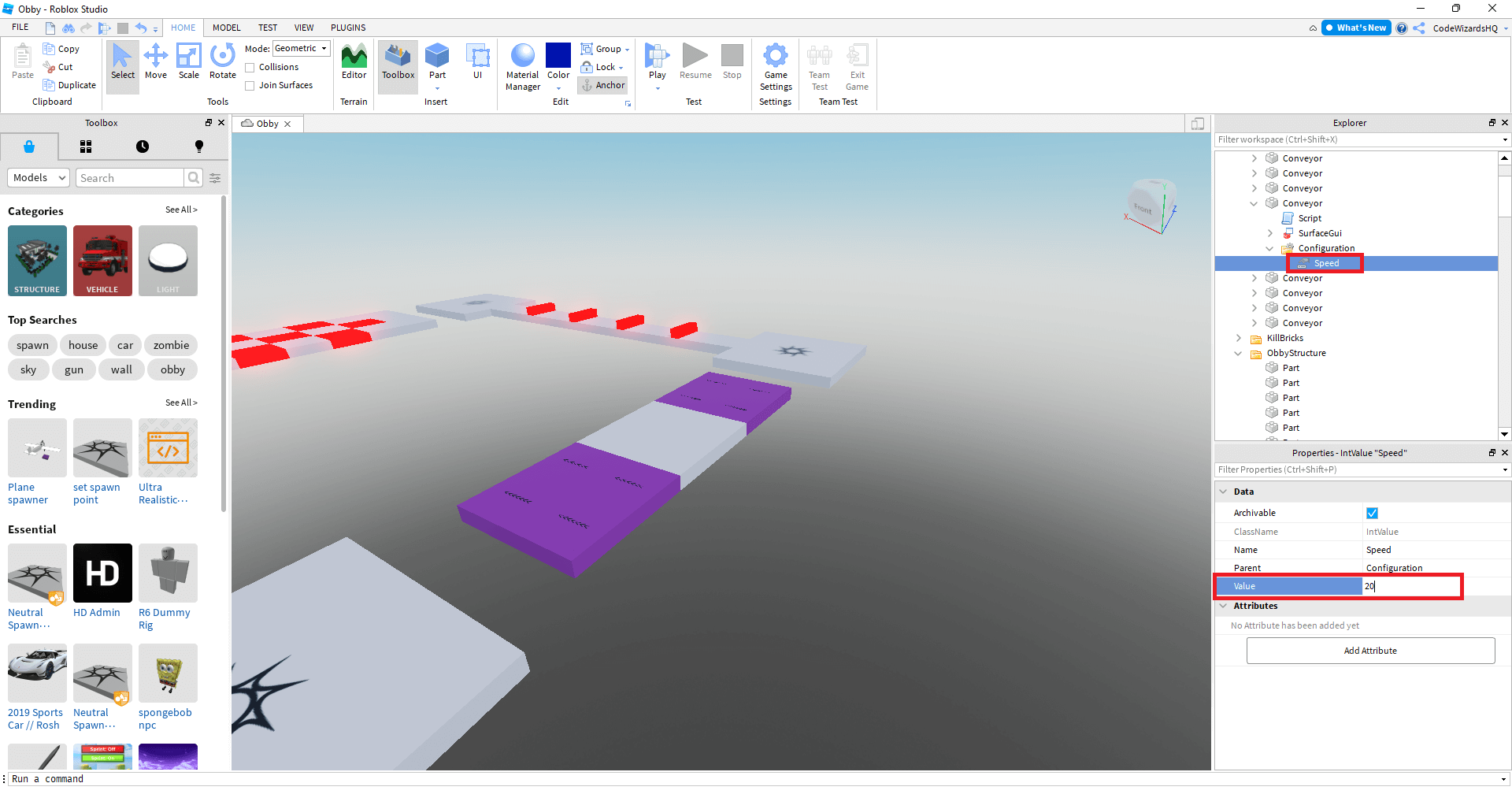
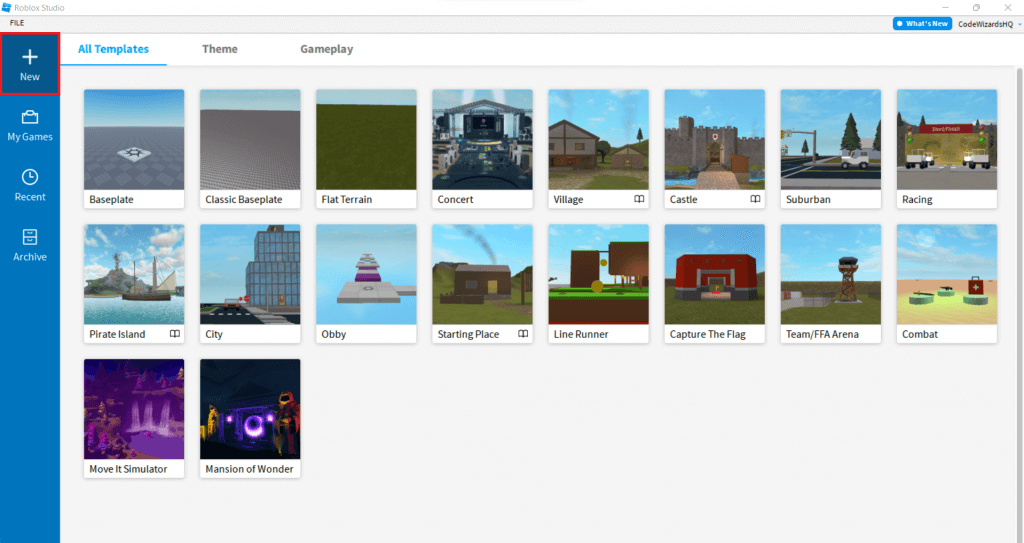
To start making a Roblox game, download and install Roblox Studio on your PC or Mac. Open the software, log in with your account, and choose a template like Baseplate or Obby. Use the Explorer and Properties windows to add parts and change their appearance. Finally, hit the Publish button to share your creation with the community.
Is coding required to make a Roblox game?
While you can build basic environments using only the 3D modeling tools, creating interactive gameplay requires coding in Luau. Luau is a beginner-friendly version of Lua designed specifically for the Roblox engine. You can use it to create scripts for things like moving platforms, damage-dealing traps, player inventories, and complex game mechanics that define your experience.
Can you actually earn money making Roblox games?
Yes, many creators earn significant income through the Developer Exchange (DevEx) program. You monetize your game by selling game passes, developer products, or avatar items for Robux. Once you accumulate enough Robux and meet the eligibility requirements, you can convert that virtual currency into real-world money. It is a legitimate career path for many dedicated developers globally.
What is the best way to learn Roblox scripting?
The best way to learn Roblox scripting is through the official Roblox Creator Documentation and community-driven tutorials. Start by understanding variables, functions, and loops before moving on to events and properties. Practicing by building small projects, such as a basic 'kill part' or a GUI button, helps solidify your knowledge through hands-on experience and troubleshooting errors.
Does Roblox Studio work on mobile devices?
No, Roblox Studio is only available for Windows and macOS computers. While you can play Roblox games on mobile devices and consoles, the actual development and scripting environment requires a desktop or laptop. This is due to the complex interface and processing power needed to handle 3D rendering and real-time code execution during the game creation process.
Most Asked Questions about making a roblox game
Making a Roblox game is like stepping into a vibrant world of infinite creativity where you are the lead designer. It is an amazing way to learn real skills like 3D modeling and computer programming while having a blast with friends. You do not need to be a tech genius to start because the tools are designed to be accessible for everyone from kids to adults. Whether you want to build a simple parkour course or a complex role-playing game, the platform provides everything you need to succeed.
I get why it might seem overwhelming at first with all the buttons and windows in the studio. Just remember that every top creator started exactly where you are right now with a single block and a dream. The most important thing is to keep experimenting and not be afraid to make mistakes along the way. You will find that the community is incredibly supportive and always willing to help a fellow developer grow. It is all about the journey of learning and seeing people enjoy the worlds you have built from scratch.
At its heart, making a Roblox game is about storytelling and creating fun moments for players around the world. It is a skill that combines technical logic with artistic flair in a way that few other hobbies can match. Plus, the chance to earn real money while doing something you love is a pretty sweet bonus for your hard work. So grab your mouse, open up that baseplate, and let your imagination run wild today. You are going to create something absolutely awesome!
Beginner Questions
How do I save my game progress? Roblox Studio automatically saves your work to the cloud every few minutes so you do not lose progress. You can also manually save by going to File and selecting Save to Roblox to ensure your latest changes are secure.
What are parts and how do I move them? Parts are the basic building blocks of any game world. You can move, scale, and rotate them using the tools at the top of the Studio interface to create any shape you imagine.
Builds & Classes
How do I make a character class system? You can use Folder objects inside ServerStorage to store different gear for various classes. Use a script to give the player specific items based on a selection GUI they click when they join the game.
Can I import custom 3D models? Yes, you can import .fbx or .obj files using the 3D Importer tool. This allows you to bring in detailed assets made in software like Blender for a more custom and professional look.
Multiplayer Issues
Why does my game lag with many players? Lag usually happens due to unoptimized scripts or too many moving parts. Try to limit the number of physics-heavy objects and use local scripts for visual effects to keep the server running smoothly.
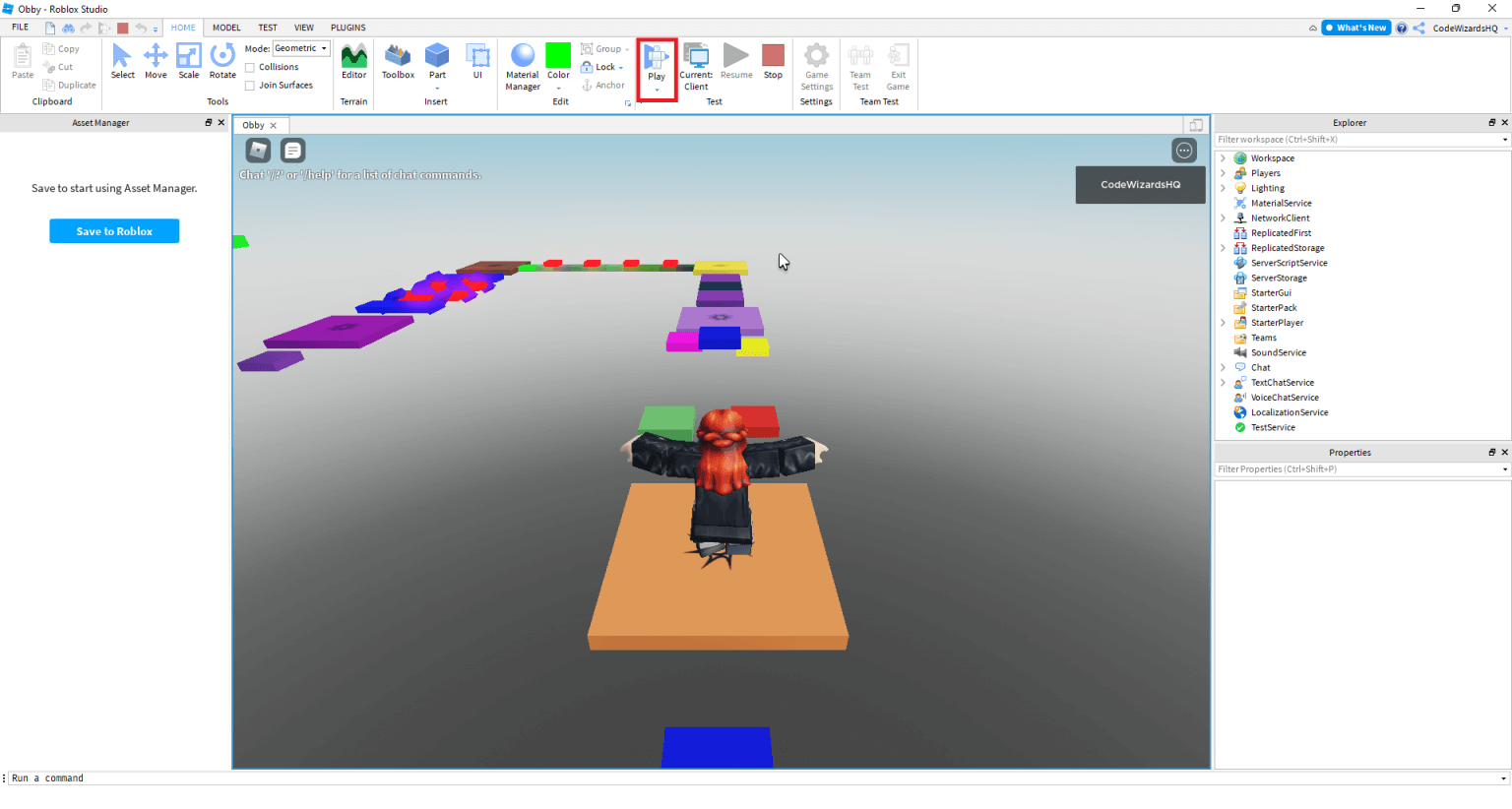
How do I test my game with friends? You can use the Team Create feature to invite friends to your studio session. Alternatively, publish your game to a private place and invite them to join the live server for a real-world test.
Endgame Grind
How do I keep players coming back? Implement a progression system with unlockable items and badges. Regular updates with new content like maps or weapons will give your veteran players a reason to keep logging in every day.
What are badges and how do I use them? Badges are awards players get for reaching milestones. You can use the BadgeService to award them when a player reaches a certain level or completes a difficult challenge in your game.
Bugs & Fixes
Why isn't my script working? Check the Output window for error messages highlighted in red. These messages will tell you exactly which line of code is failing and provide a hint about what went wrong so you can fix it.
My parts are falling through the floor! This happens when the Anchor property is not checked. Select your parts and click the Anchor button in the top menu to keep them locked in place in the game world.
Tips & Tricks
How do I use the Toolbox safely? The Toolbox is great for assets but be careful of scripts inside models. Always check for 'backdoors' or malicious code that could give others control over your game before you publish it.
Use keyboard shortcuts to build faster. Learning shortcuts like Ctrl+D to duplicate or Ctrl+G to group objects will save you hours of time. Efficiency is key when you are working on a massive project with many details.
Still have questions? Check out our guides on Roblox Scripting for Pros and How to Market Your Roblox Game to get even more tips!How can I start making my own professional Roblox game today?
The journey of building your very first Roblox game begins with the installation of the powerful Roblox Studio software tool. You are stepping into a massive ecosystem where millions of players explore diverse worlds created by people just like you. It feels like standing in front of a giant digital sandbox where your only real limit is your own imagination. Most people wonder if they need a computer science degree to create something successful but that is simply not true. You can start by dragging and dropping simple parts to build a house or a basic obstacle course right now. The platform handles the complicated multiplayer networking and server hosting so you can focus entirely on the fun gameplay loops.
Core Concepts of Building Your World
Every successful game on the platform starts with a solid foundation built inside the intuitive and robust Roblox Studio interface. You will use various parts and materials to construct the physical environment where your players will spend their valuable time. It is vital to understand how the explorer and properties windows allow you to manipulate every single object in space. Think of these tools as your digital hammer and nails for crafting the ultimate interactive experience for your future fans. Once you master the basics of placement and anchoring you can move on to more complex environmental design techniques.
Mastering the Power of Luau Scripting
To breathe life into your creation you must learn the basics of Luau which is a fast and easy language. Scripting allows you to create interactive doors or complex combat systems that keep your players engaged for many hours daily. I remember when I first tried to code a simple kill part and felt so overwhelmed by the syntax. Do not let the initial learning curve discourage you because the community offers thousands of free tutorials and helpful resources. You should start with small scripts that change colors or move parts before tackling advanced data stores and global leaderboards.
Maximizing Player Engagement and Retention
Great games are not just about pretty graphics but they are about keeping people coming back to play every day. You need to design a compelling progression system that rewards players for their time spent inside your unique virtual world. Consider adding daily login bonuses or special limited time events to create a sense of urgency and excitement for players. Building a community on social media platforms like Discord or X helps you gather feedback and improve your game rapidly. Always listen to your players because they are the ones who will ultimately determine the success of your project.
Navigating the DevEx and Monetization Path
Many creators dream of turning their hobby into a full time career by using the amazing Developer Exchange program features. You can sell game passes or developer products that enhance the player experience while earning virtual currency called Robux today. Once you reach a certain threshold of earned Robux you can apply to exchange them for real United States dollars. It is important to balance monetization with fair gameplay so that you do not drive away your dedicated player base. Focus on creating value for your players and the financial rewards will naturally follow as your game grows bigger.
Beginner / Core Concepts
1. **Q:** Why should I choose Roblox over other game engines?
**A:** I get why this choice feels so big because there are so many options like Unity or Unreal Engine out there. Roblox is unique because it provides the entire multiplayer infrastructure and a massive built in audience for your new game. You do not have to worry about server costs or matchmaking systems because the platform handles everything for you automatically. It is the perfect place to learn the ropes of game design without the technical headaches of traditional game development. You can literally publish a game and have players joining your world within seconds of hitting the upload button. You have got this!
2. **Q:** Do I need to be good at math to script?
**A:** This one used to trip me up too because I was never a math whiz during my high school years. While some advanced 3D physics require math most gameplay scripting only requires basic logic and a bit of creative thinking. You will find yourself using simple addition and subtraction much more often than complex calculus or high level trigonometry functions. Most coding is just telling the computer what to do in a specific order using very simple and direct instructions. Just take it one step at a time and you will be amazed at what you can build. Try this tomorrow and let me know how it goes!
3. **Q:** How much does it cost to publish a game?
**A:** I have some great news for you because publishing your game on the Roblox platform is actually completely free today. You do not need to pay any monthly fees or upfront costs to share your creative work with the world. This low barrier to entry makes it the most accessible platform for young developers to start their professional gaming careers. You only need a computer that can run the Studio software and an internet connection to start your development journey. It is a win win situation for anyone who wants to experiment with game design without any financial risk. Go ahead and publish your first draft today!
4. **Q:** Can I make games with my friends?
**A:** Collaborative building is actually one of the best features of the Studio environment and it is called Team Create mode. You and your friends can work on the same map at the exact same time from different locations around world. It makes the development process much faster and much more fun when you can share the workload with your buddies. You can see each other moving parts in real time which helps with coordination and collective creative brainstorming sessions. Building together is a fantastic way to stay motivated and finish your project much sooner than working alone. Reach out to a friend and start a project together!
Intermediate / Practical & Production
5. **Q:** What is the best way to handle player data?
**A:** Data persistence is a huge topic and I remember how nervous I was about losing player progress in my games. You should use the DataStoreService to save things like player levels and currency so they can pick up where they left. Many developers prefer using external modules like DataStore2 to ensure that data is saved reliably and prevents any accidental loss. Always make sure to test your saving logic thoroughly before you release a major update to your growing player base. It is the most important part of keeping your players happy and invested in your long term game world. You will be a data pro in no time!
6. **Q:** How do I make my game work on mobile?
**A:** Designing for mobile is essential because more than half of the Roblox audience plays on phones and tablets every day. You need to ensure your UI elements are large enough to be tapped and do not clutter the small screen. Use the ContextActionService to create on screen buttons that only appear when players are using a mobile device for play. It is also important to optimize your game performance so it runs smoothly on older hardware without crashing or lagging. Testing your game on a real mobile device is the best way to see what your players experience. Your mobile players will thank you for the effort!
7. **Q:** What are RemoteEvents and why do I need them?
**A:** This concept confuses so many people but it is basically just a way for the client and server to talk. Since the client cannot be trusted you must use RemoteEvents to tell the server when a player wants to act. For example when a player clicks a button to buy an item the client sends a signal to the server. The server then checks if the player has enough money before actually giving them the item in their inventory. It is the gold standard for keeping your game secure from exploiters who want to ruin the fun experience. Keep practicing and it will become second nature!
8. **Q:** How can I get more people to play my game?
**A:** Getting your first hundred players is often the hardest part of the entire game development process on this platform. You should create an eye catching thumbnail and an engaging title that makes people want to click on your game. Utilizing the Roblox advertising system can help jumpstart your player count if you have a few extra Robux to spend. Social media is also a powerful tool for building hype and showing off cool behind the scenes development clips. Consistency is the key to success so keep updating your game and listening to what your fans want. You are doing great so far!
9. **Q:** What is the best way to organize my scripts?
**A:** Keeping your workspace clean is a total life saver when your project starts to get large and very complex. You should use ModuleScripts to store reusable code that can be accessed by both the server and the client scripts. Give your variables and functions clear names that describe exactly what they do so you do not get lost later. I always suggest using folders to group related items like all your weapons or all your environmental props together. A tidy project is a happy project and it makes debugging your code a whole lot easier for you. Organization is your secret weapon for success!
10. **Q:** How do I fix lag in my Roblox game?
**A:** Lag is the ultimate enemy of fun and I have spent many nights trying to hunt down performance issues. You should check if you have too many unanchored parts or if your scripts are running unnecessary loops every single frame. Use the MicroProfiler tool inside Studio to see exactly what is slowing down your game engine during live play. Reducing the number of light sources and complex meshes can also help boost the frame rate for your mobile players. Small optimizations can lead to a much smoother and more enjoyable experience for everyone who joins your game. You can totally fix this issue!
Advanced / Research & Frontier
11. **Q:** How do I implement a custom physics system?
**A:** I get that the default physics can feel a bit restrictive when you are trying to make something unique. You can use VectorForces and BodyMovers to override the standard gravity and create custom movement mechanics for your game. This is how creators make realistic cars or complex flying systems that feel different from the standard Roblox character. It requires a deeper understanding of vector math and how the physics engine updates every single step of time. Don't be afraid to experiment with different values until the movement feels exactly right for your specific game. You are pushing the boundaries of the platform!
12. **Q:** What is the most efficient way to use Raycasting?
**A:** Raycasting is a powerful tool for weapons systems and custom cameras but it can be heavy if used incorrectly. You should always use the WorldRoot:Raycast method and define specific parameters to ignore certain objects in your game world. This prevents your rays from hitting the player who is firing the weapon or hitting invisible barriers in the map. Limit the number of rays you cast per frame to keep the server performance high and the gameplay smooth. Mastering raycasting will allow you to create professional grade shooters and complex environmental interactions for your players. You have got this advanced skill down!
13. **Q:** How do I secure my game against advanced exploiters?
**A:** This is a constant battle for top developers but the key is to never trust the client for anything. Always perform sanity checks on the server to make sure player actions are actually possible within your game rules. For example if a player teleports across the map the server should detect that impossible speed and reset them. Use secure DataStores and hidden server side logic to protect your game economy from being manipulated by bad actors. Security is a mindset that you build over time as you learn how people try to break things. Stay vigilant and keep your community safe!
14. **Q:** Can I use external tools like Blender with Roblox?
**A:** Absolutely and using external 3D modeling software is how you make your game look truly professional and unique. You can create complex meshes in Blender and import them into Studio to save on part count and performance. This allows for much more detailed characters and environments than what you can achieve with basic blocks alone. Many top developers also use external code editors like VS Code with Rojo to manage their scripting workflows more efficiently. Combining these professional tools with the Roblox engine gives you a massive advantage in the competitive marketplace today. Your artistic vision is about to come to life!
15. **Q:** How do I scale a game to thousands of players?
**A:** Scaling requires a deep understanding of memory management and server load balancing to keep everything running perfectly for everyone. You need to use streaming enabled features to only load parts of the map that are near the player. This saves a huge amount of memory and allows for massive open world environments that would otherwise crash the game. Be mindful of how much data you are sending over the network and try to compress your signals whenever possible. Large scale games are a huge challenge but seeing thousands of people enjoying your work is incredibly rewarding. You are ready for the big leagues now!
Quick Human-Friendly Cheat-Sheet for This Topic
- Install Roblox Studio and start playing with the template maps to see how they are built.
- Learn the basics of the Luau language through the official documentation and community YouTube videos.
- Always anchor your parts unless you want them to fall down as soon as the game starts.
- Use the Toolbox sparingly because making your own assets helps your game stand out from others.
- Join developer communities on Discord to find mentors and friends who can help you learn faster.
- Test your game on different devices frequently to ensure a good experience for all your players.
- Do not give up when your code doesn't work the first time because debugging is part of the fun.
Mastering Roblox Studio tools, Learning Luau scripting language, Utilizing the DevEx monetization system, Building community through Discord, Optimizing for cross platform play, Understanding game design loops, Leveraging the Roblox Creator Hub.
35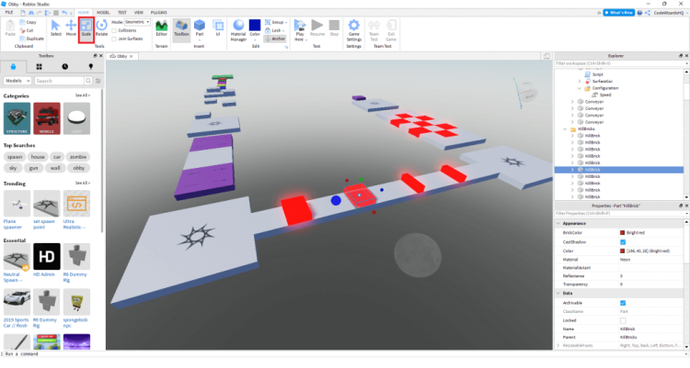


Creating A Roblox Game Step By Step Guide Resized . How To Make A Roblox Game In 15 Minutes Create Roblox Games Step 10 1536x822 . How To Make Roblox Game Public Step By Step YouTube . How To Publish A Game On Roblox In 2026 Roblox YouTube . How To Make Your FIRST Roblox Game 2026 Full Guide YouTube





How To Make A Roblox Game With AI Complete 2026 Guide Image. How To Make A Game Pass In Roblox 2026 Step By Step Guide Game Pass Roblox.webp. 15 Best Roblox Horror Games Of 2026 15 Game Roblox Horror Terbaik 2026 Paling Seram And Bikin Deg Degan 7f944699ce . How To Make A Roblox Game On Mobile 2026 New Update YouTube . How To Make A Roblox Game Complete Beginners Guide YouTube
How To Start Making Roblox Games 2026 Update Very Easy YouTube . Creating A Roblox Game Step By Step Guide Mq6c1exixh. How To Make A Fun Roblox Game For Free And Publish It Screen Shot 2024 08 20 At 9.59.44 AM . Build Games In Roblox Creator Hub Nuhogames Screen Shot 2022 12 20 At 1.49.27 PM . How To Make A Roblox Game In 2023 Easy Guide Beebom How To Make A Roblox Game In 2023



How To Make A Roblox Game Beginner Tutorial In 2026 FREE YouTube . How To Create A Roblox Game Complete Step By Step Tutorial A Guide On How To Create A Game On Roblox.webp. How To Make ROBLOX GAMES On MOBILE 2026 Roblox Studio YouTube . Make Your Own Roblox Game A Beginners Guide Step 7 . How To Make ROBLOX Games On Mobile 2026 IOS Android YouTube



How To Publish A Roblox Game 2026 Complete Roblox Studio Tutorial . Roblox 2026 Logo REVEALED New Color New Look YouTube Maxres2 . How To Make A Roblox Game In 15 Minutes Create Roblox Games Step 2 1024x543 . Exploring Roblox Games For 2026 What Makes Them Popular Best Roblox Games Natural Distaster Survival . HOW TO MAKE ROBLOX GAME ON MOBILE 2026 QUICK EASY YouTube


How To Make A Roblox Game Complete Development Guide How To Make A Roblox Game Featured Image . How To Make A Roblox Game Roblox Game Making GameDev Academy Img 768x479 . How To Start Making Roblox Games 2026 Update Very Easy YouTube Hqdefault . HOW TO MAKE A ROBLOX GAME EXPERIENCE ON MOBILE 2026 YouTube . How To Make A Game In Roblox In 2026 Complete Beginner S Guide Adellion Image



How To Make Your OWN OFFICIAL GAME On Roblox Studio YouTube . The Definitive Guide To Roblox Annual 2026 Phillips Toys 61HEet5s7ML 1445x . Ready To Share How To Publish Your Roblox Game . 12 Best Enterprise Game Development Software In 2026 Web App Library Categories Providers Screenshots 001 687 077 Pub Roblox Screenshot 1710431849 . How To Message On Roblox 2026 A Quick Guide SL1500