Navigating the world of 4K gaming can feel like a labyrinth, especially when trying to pinpoint the best CPU to power your ultimate setup. This comprehensive guide is designed for the discerning US gamer who balances life's demands with a passion for high-resolution experiences. We cut through the hype to deliver practical, actionable advice on choosing a processor that delivers smooth framerates, supports your social gaming habits, and offers genuine value for money in 2026. Discover how CPU choice impacts 4K performance, understand the latest Intel and AMD offerings, and learn to avoid common bottlenecks without breaking your budget. Whether you are upgrading an existing rig or building anew, our insights will help you make an informed decision, ensuring your 4K gaming adventures are nothing short of spectacular. Get ready to optimize your setup, tackle performance issues, and finally achieve that buttery-smooth 4K gameplay you have been dreaming of.
Which specific Intel CPU model is ideal for 4K gaming on a mid-range budget?
For mid-range 4K gaming with an Intel CPU, the Intel Core i7-14700K offers an excellent balance. It provides strong single-core performance crucial for gaming and sufficient multi-core capability for background tasks, all without the premium price of the i9, making it a smart investment for 4K gamers balancing performance and cost.
What AMD CPU offers the best value for 4K gaming performance right now?
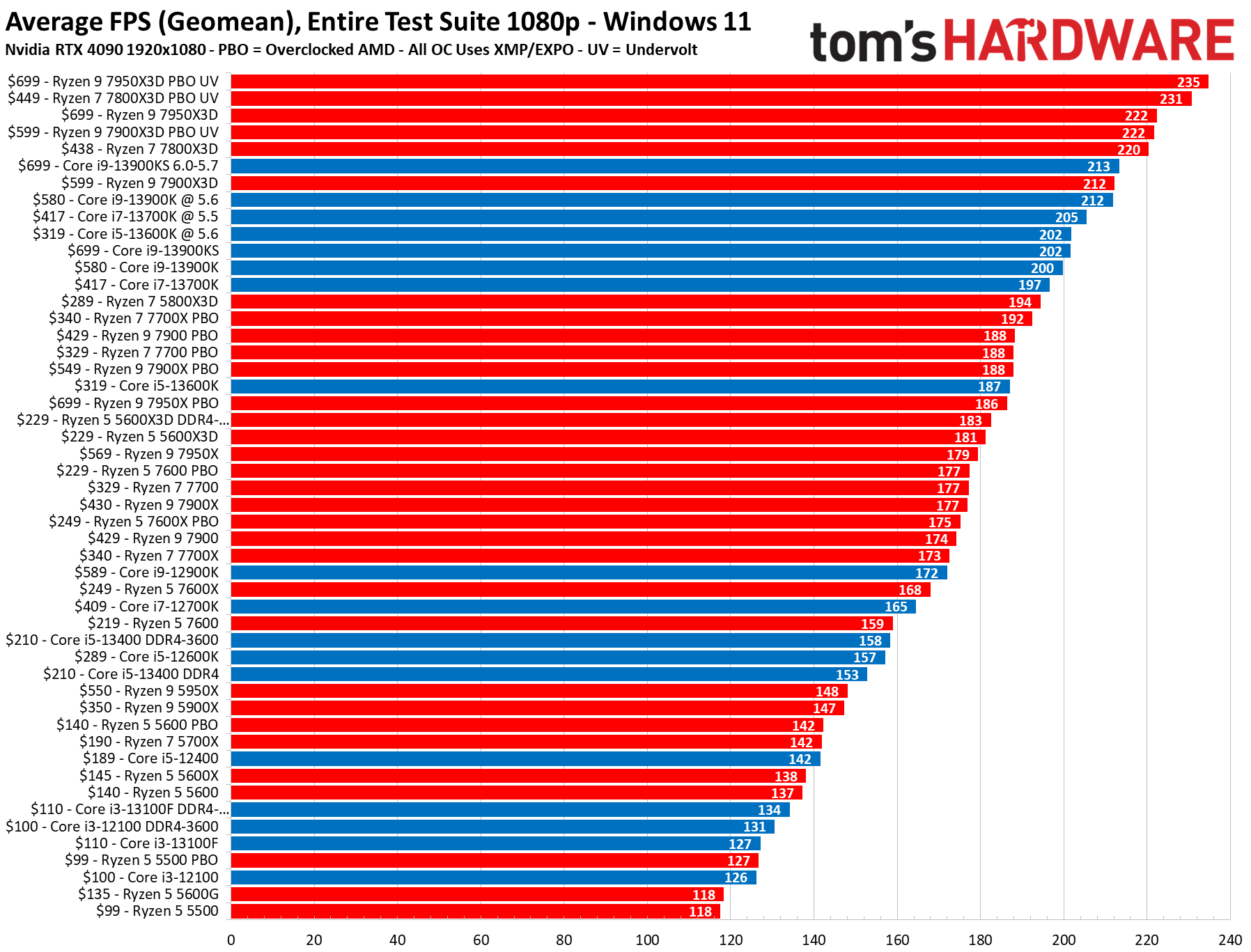
The AMD Ryzen 7 7800X3D stands out as the best value AMD CPU for 4K gaming. Its innovative 3D V-Cache significantly boosts in-game performance, often outperforming even more expensive chips from both AMD and Intel in many titles. This makes it an incredibly efficient choice for gamers prioritizing raw framerates at 4K resolution.
How does CPU core count impact 4K gaming versus clock speed?
For 4K gaming, raw clock speed and strong single-core performance are generally more impactful than an extremely high core count. While multiple cores help with background tasks like streaming, most games don't fully utilize more than 6-8 cores. The GPU is the primary driver at 4K, so a CPU with excellent per-core performance ensures it can efficiently prepare data for the GPU without becoming a bottleneck.
Is liquid cooling necessary for a high-end 4K gaming CPU?
For a high-end 4K gaming CPU, a quality liquid cooler (AIO) is highly recommended, though not always strictly 'necessary.' Powerful CPUs like the Intel i9 or AMD 7950X3D can generate substantial heat. Liquid cooling allows these chips to maintain higher boost clocks for longer periods, preventing thermal throttling and ensuring consistent peak performance during intense 4K gaming sessions. A top-tier air cooler can suffice, but AIOs generally offer superior thermal management.
What RAM speed pairs best with current 4K gaming CPUs?
For current 4K gaming CPUs (both Intel and AMD), DDR5 RAM with speeds around 6000MHz and low latency (CL30 is ideal) offers the best performance sweet spot. While faster RAM exists, 6000MHz CL30 provides an excellent balance of speed, stability, and cost-effectiveness, optimizing data transfer between the CPU and memory for smoother framerates and better overall system responsiveness in 4K games.
Can an older CPU bottleneck a new 4K GPU, even at 4K resolution?
Yes, absolutely. Even at 4K resolution, where the GPU is typically the primary bottleneck, an older, less powerful CPU can still create a significant bottleneck. If the CPU cannot process game logic, draw calls, or AI fast enough to feed data to the GPU, your expensive 4K GPU will sit idle part of the time, leading to lower-than-expected framerates and inconsistent performance. This is particularly noticeable in CPU-intensive games or scenes.
What are common signs of a CPU bottleneck in 4K gaming?
Common signs of a CPU bottleneck in 4K gaming include consistently low GPU utilization (e.g., below 90%) while your CPU is running at or near 100%, sudden and severe framerate drops in certain game areas, stuttering or hitching despite a powerful GPU, and overall inconsistent frame times. You might also notice that upgrading your GPU yields minimal performance improvement, suggesting the CPU is holding it back.
Hey fellow gamers! Ever find yourself scrolling through forums late at night, trying to figure out if your rig can handle that stunning new 4K game you just bought? Or maybe you are eyeing an upgrade, but with work, family, and life always on the go, you just want clear answers without wading through endless tech jargon. We get it. For many of us, gaming is that precious escape, a way to unwind, connect with friends on Discord, or sharpen those reflexes. And when it comes to 4K gaming, you want every pixel to sing, not stutter.
You are not alone. US gamers, averaging around 36 years old, regularly commit 10+ hours a week to gaming, with a significant 87% playing consistently. While mobile gaming continues its dominance, the allure of crisp 4K visuals on a big screen remains powerful for PC and console cross-play enthusiasts. The good news is that achieving glorious 4K gaming in 2026 is more accessible than ever, but picking the right brain for your beast – the CPU – is crucial. Forget the hype and let's dive into practical solutions for making your 4K dreams a reality without breaking the bank or your sanity.
What is the Best CPU for 4K Gaming in 2026?
For most high-end 4K gaming setups in 2026, the AMD Ryzen 7 7800X3D often stands out as a top contender due to its exceptional gaming performance, especially with its 3D V-Cache technology. Intel's Core i7-14700K or the flagship i9-14900K also offer incredible raw power and strong gaming benchmarks, making them excellent choices. When selecting the best CPU, consider not just raw clock speed but also efficient core architecture that handles background tasks like streaming or running multiple applications smoothly. The sweet spot usually lies in high single-core performance combined with ample multi-core capability.
Does CPU Matter for 4K Gaming as Much as the GPU?
While the GPU undeniably carries the heaviest load at 4K resolution, pushing millions of pixels every second, the CPU absolutely still matters significantly. In 4K, the GPU is often the bottleneck, meaning it's working at 99-100% utilization. However, a weak CPU can still starve even a powerful GPU of essential data, leading to what's known as a CPU bottleneck. This results in inconsistent frame times, stuttering, and overall lower framerates than your expensive GPU is capable of. Think of it like a highway: the GPU is the main road, but the CPU is the on-ramp, and if the on-ramp is too narrow, traffic will back up, no matter how wide the main highway is.
Intel vs AMD: Which is Better for 4K Gaming in 2026?
Both Intel and AMD offer fantastic CPUs for 4K gaming, and the competition is fiercer than ever. For pure gaming performance, especially in titles that benefit from large cache sizes, AMD's X3D series (like the Ryzen 7 7800X3D or Ryzen 9 7950X3D) often takes the lead. Their integrated 3D V-Cache significantly boosts frame rates in many games. Intel, on the other hand, often boasts higher raw clock speeds and excellent multi-core performance, making chips like the Core i7-14700K or i9-14900K strong choices for gamers who also do heavy multitasking, video editing, or streaming while gaming. Your choice may come down to specific game optimizations and overall system ecosystem preference, but both brands deliver premium 4K experiences.
How Much Should You Spend on a 4K Gaming CPU?
For a dedicated 4K gaming CPU in 2026, expect to spend anywhere from $300 to $600. While higher-end CPUs exist, the law of diminishing returns kicks in quickly for purely gaming purposes at 4K. Your primary investment should always be in the GPU. A mid-to-high range CPU, like an AMD Ryzen 7 or Intel Core i7 from the current or previous generation, offers an excellent balance of performance and value. Spending more than this range often yields marginal gains in 4K framerates that could be better allocated to a more powerful graphics card or a higher refresh rate 4K monitor. Remember, we're all about smart spending for maximum fun.
What are the Top CPUs for 4K Gaming This Month?
Based on current trends and benchmarks, here are some of the standout CPUs for 4K gaming this month:
- AMD Ryzen 7 7800X3D: Frequently tops gaming benchmarks, especially strong in titles that leverage its 3D V-Cache. Offers incredible efficiency.
- Intel Core i7-14700K: A powerhouse with excellent single-core performance and a high core/thread count for hybrid workloads. Great for gamers who also stream or create content.
- AMD Ryzen 9 7950X3D: If you need top-tier gaming AND workstation performance, this chip delivers both, though its gaming lead over the 7800X3D can be game-dependent.
- Intel Core i9-14900K: Intel's top-dog, offering unmatched raw multi-core power. Fantastic for all tasks, including gaming, but comes with a higher price tag and power consumption.
Remember to check current prices and bundle deals, as these can fluctuate and offer surprising value.
How to Avoid CPU Bottlenecking at 4K Resolution?
Preventing a CPU bottleneck in 4K gaming involves a few key strategies:
- Balance Your Build: Ensure your CPU is adequately powerful for your chosen GPU. A general rule is not to pair a budget CPU with a flagship 4K GPU.
- Monitor Utilization: Use tools like MSI Afterburner or HWMonitor to check your CPU and GPU utilization during gaming. If your GPU utilization is consistently below 95-100% while your CPU is maxed out, you likely have a CPU bottleneck.
- Optimize Game Settings: While 4K is GPU-heavy, certain CPU-intensive settings (like AI calculations, draw distance, or physics) can still tax your processor. Experiment with these if you suspect a bottleneck.
- Update Drivers: Keep your CPU chipset drivers and GPU drivers up to date. Performance optimizations are frequently included in new releases.
- Clean Background Processes: Close unnecessary applications running in the background while gaming to free up CPU cycles.
When Should You Upgrade Your CPU for 4K Gaming?
You should consider upgrading your CPU for 4K gaming if you experience consistent stuttering, unplayable framerates, or significantly lower GPU utilization than expected, even after upgrading your graphics card. If your current CPU is several generations old (e.g., pre-Intel 10th gen or AMD Ryzen 3000 series) and you're paired with a modern 4K-capable GPU, a CPU upgrade will likely provide a noticeable boost in overall system responsiveness and minimum framerates. For most gamers, upgrading every 3-5 years is a good rhythm, but always prioritize the GPU first for 4K.
Can Budget CPUs Handle 4K Gaming?
The short answer is: sometimes, but with significant compromises. While a budget CPU might *launch* a 4K game, it will struggle to deliver a smooth, enjoyable experience, especially in demanding AAA titles or competitive esports. You might see frequent framerate drops, stuttering, and an inability to maintain 60 frames per second. For casual, less demanding 4K games or older titles, a solid mid-range CPU could suffice, but for the true 4K experience, investing in at least a mid-to-high-tier CPU is highly recommended. Balancing your budget between a capable CPU and a powerful GPU is key to satisfaction.
Beyond the CPU: Other Factors for Smooth 4K Gaming
While the CPU is vital, remember it's part of a symphony. To truly unlock smooth 4K gaming, consider these other components:
- GPU (Graphics Processing Unit): This is king for 4K. Aim for a modern high-end card like an RTX 4080 Super, RTX 4090, or RX 7900 XTX for optimal performance.
- RAM (Random Access Memory): At least 32GB of fast DDR5 RAM (e.g., 6000MHz CL30) is ideal for 4K gaming in 2026.
- Storage: A fast NVMe SSD is essential for quick game loading times and system responsiveness.
- Monitor: A high-quality 4K monitor with a good refresh rate (120Hz+) and features like G-Sync or FreeSync enhances the visual experience.
- Cooling: A robust cooling solution (air or liquid) is crucial for high-performance CPUs to prevent thermal throttling and maintain boost clocks.
- Power Supply Unit (PSU): Don't skimp here. A reliable PSU with enough wattage for your components ensures system stability.
Conclusion: Your Path to 4K Glory
Choosing the best CPU for 4K gaming in 2026 doesn't have to be a headache. By understanding its role, balancing your budget, and looking at real-world performance, you can build a rig that delivers stunning visuals and smooth gameplay. Remember, it's about smart choices that fit your lifestyle and gaming habits, allowing you to relax, compete, and connect without tech frustrations. Invest wisely in a CPU that complements your powerful GPU, and you will be well on your way to a truly immersive 4K experience.
What's your biggest gaming challenge when it comes to performance or upgrades? Comment below!
FAQ Section
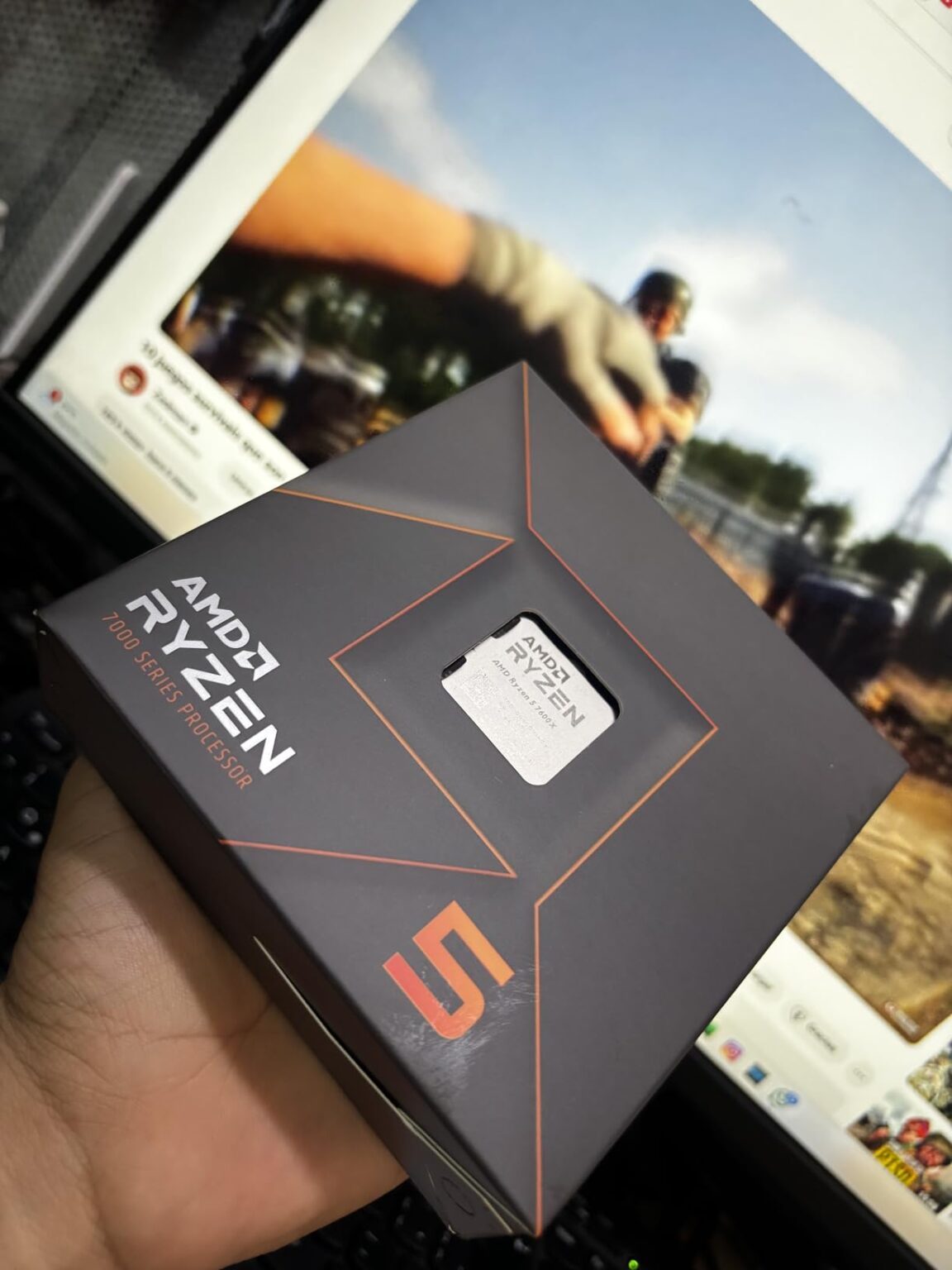
Q: Is a Ryzen 5 7600X good for 4K gaming?
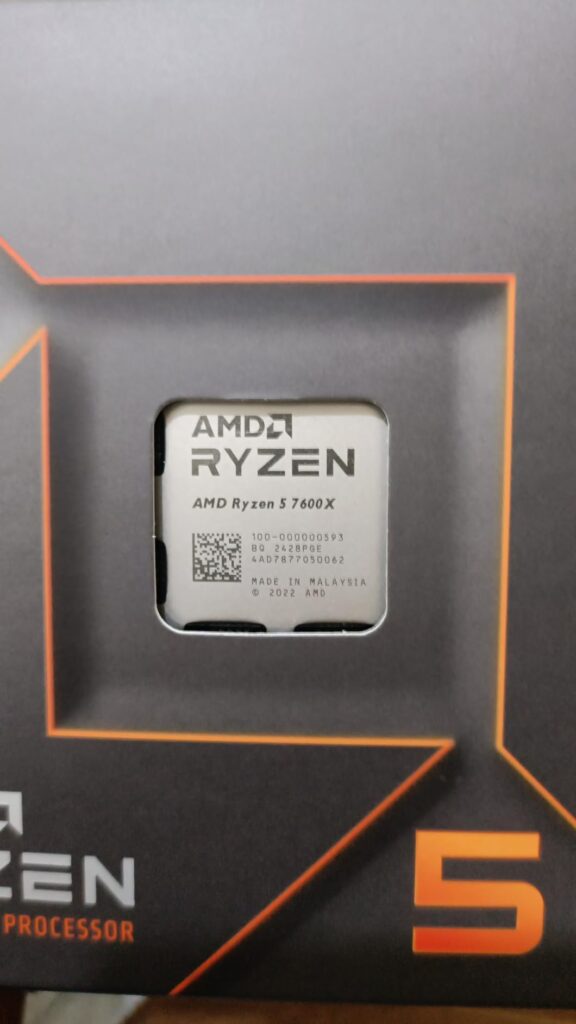
A: The Ryzen 5 7600X is a capable CPU, and while it can handle 4K gaming, it generally acts as a strong budget option. Paired with a top-tier GPU, it might show slight CPU bottlenecks in very demanding titles compared to higher-end chips, but for many games, it offers excellent performance per dollar, making it a viable choice for cost-conscious gamers.
Q: Do I need 64GB RAM for 4K gaming?
A: For pure 4K gaming, 32GB of fast DDR5 RAM is typically the sweet spot in 2026 and provides ample overhead for most titles and background applications. 64GB is generally overkill unless you are also doing heavy video editing, 3D rendering, or running multiple virtual machines concurrently with your gaming. For most gamers, the extra investment is better spent on a stronger GPU or CPU.
Q: How much FPS can I expect with a high-end 4K gaming CPU and GPU?
A: With a high-end 4K gaming CPU (like a Ryzen 7 7800X3D or Intel Core i7-14700K) and a top-tier GPU (like an RTX 4090 or RX 7900 XTX), you can expect to achieve 60-100+ FPS in most demanding AAA titles at maximum settings, and significantly higher in less demanding or esports titles. Performance varies greatly by game optimization, specific settings, and API used.
Q: Is an older generation i9 still good for 4K gaming?
A: An older generation i9 (e.g., 10th or 11th gen) can still be decent for 4K gaming, especially if paired with a powerful modern GPU. However, it might struggle with minimum framerates and frametime consistency compared to newer architectures. While it won't be a catastrophic bottleneck in all scenarios due to 4K being GPU-bound, a modern mid-range CPU will often offer a smoother, more efficient experience, especially in CPU-intensive game areas.
Q: What is CPU cache and why is it important for 4K gaming?
A: CPU cache is a small, very fast memory buffer on the CPU itself that stores frequently accessed data, allowing the CPU to retrieve it much quicker than from system RAM. For 4K gaming, a larger and faster cache (like AMD's 3D V-Cache) can significantly reduce latency and improve minimum framerates by ensuring the CPU can feed data to the GPU more efficiently. This is especially beneficial in games with complex AI, many objects, or high frame rates.
Q: How does cooling affect CPU performance in 4K gaming?
A: Effective cooling is crucial for high-performance CPUs in 4K gaming because modern processors boost their clock speeds based on thermal headroom. If your CPU gets too hot, it will automatically 'throttle' or reduce its speed to prevent damage, leading to decreased performance and potential stuttering in games. A good cooler (whether air or AIO liquid) ensures your CPU can maintain its peak boost clocks for longer, providing consistent and optimal framerates during intense gaming sessions.
Top CPUs for 4K Gaming 2026, CPU importance in 4K, Intel vs AMD for 4K, Avoiding 4K bottlenecks, Budget 4K CPU options, Future-proofing your 4K build, Gaming performance optimization, Latest hardware trends for 4K.
35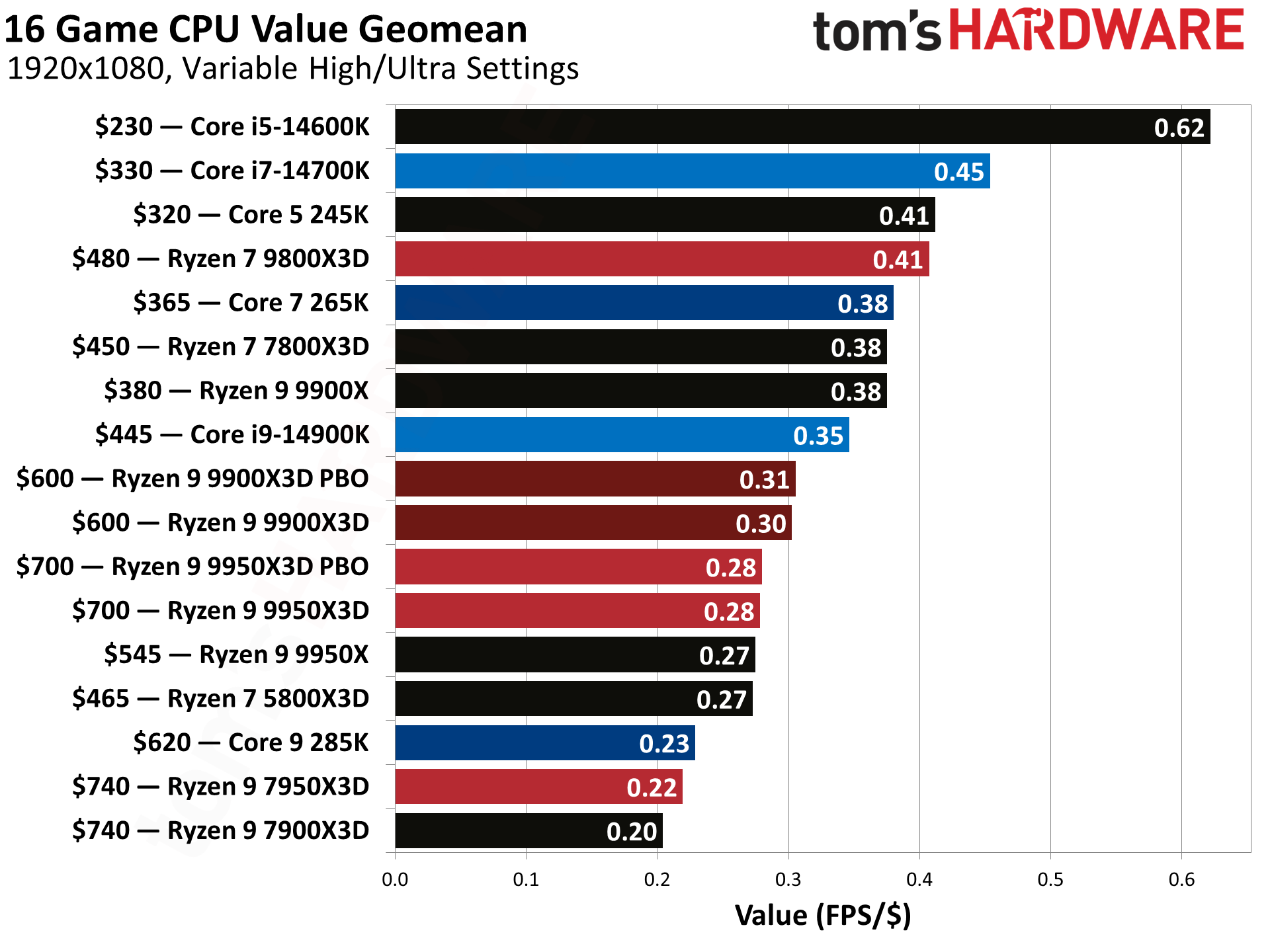

Grab This Awesome 4K Ready Gaming PC With A 7800X3D And RX 9070 XT For . Best Gaming CPUs 2026 4 Processors Tested And Ranked Best Gaming CPUs . AMD Gained Consumer Desktop And Laptop CPU Market Share In 2024 Server . 8 Best CPUs For 4K Gaming January 2026 Tested Reviews B0DKFMSMYK Customer 3 11 1152x1536 . Best CPU For Gaming In 2026 Tested Desktop Laptop Picks AMD Ryzen 9

8 Best CPUs For 4K Gaming January 2026 Tested Reviews B0BBJDS62N Customer 2 64 576x1024 . 12 Best Gaming PC Under 500 In 2026 Tested Reviewed Best CPU For 4K Video Editing PC Build 1024x576 . 9 Best 13th Gen Intel CPU January 2026 Reviews Comparisons Best CPU For RTX 3070 . The 15 Best Gaming PC In 2026 Tested Reviewed Com Best AMZ Ryzen CPU For Gaming 768x432 . 8 Best CPU For 4K Gaming March 2026 Tested Reviewed Featured Image 59 Oh7ja 300x210


8 Best CPUs For 4K Gaming February 2026 Tested Reviews B09FXNVDBJ Customer 3 11 . Best CPUs For 4K Gaming In 2026 Top Picks WhalesDev GPU AMD Ryzen 7 7800X3D. Top 10 Most Anticipated Games Of 2026 What To Watch Out For TVN GAMES IN 2026 . 8 Best Budget 4K CPU Choice 2026 Tested For 4K Gaming B09VCHR1VH Customer 2 3 . 8 Best CPUs For 4K Gaming January 2026 Tested Reviews B09VCHQHZ6 Customer 3 8 1536x1152


8 Best CPUs For 4K Gaming February 2026 Tested Reviews B0D6NN87T8 Customer 4 . 8 Best CPU For 4K Gaming March 2026 Tested Reviewed B0BCF57FL5 Customer 2 9 1152x1536 . 8 Best CPUs For 4K Gaming January 2026 Tested Reviews B0D6NMDNNX Customer 1 24 864x1536 . Best Gaming PC Builds For 2026 Best Gaming PC Builds For 2026.webp. Best 4K Gaming CPU 2026 8 Processors Tested B0BTZB7F88 Customer 2 19 768x1024


Best 4K Gaming CPU 2026 8 Processors Tested Featured Image 8md21m6o . Best 4K Gaming CPU 2026 8 Processors Tested B0D6NN6TM7 Customer 1 20 1152x1536 . Best 4K Gaming CPU 2026 8 Processors Tested B09NPJRDGD Customer 1 25 1152x1536 . Best 4K Gaming CPU 2026 8 Processors Tested B09FWYK5M9 Customer 1 10 1152x1536 . 8 Best CPUs For 4K Gaming February 2026 Tested Reviews Featured Image Sdce Yc4



Best 4K Gaming CPU 2026 8 Processors Tested B0BBJDS62N Customer 1 37 1152x1536 . Best 4K Gaming CPU 2026 8 Processors Tested B0BTZB7F88 Customer 1 30 1024x768 . Best 4K Gaming CPU 2026 8 Processors Tested B0D6NNDQ92 Customer 1 11 865x1536 . 8 Best CPUs For 4K Gaming January 2026 Tested Reviews B0DKFMSMYK Customer 1 49 1152x1536 . 8 Best CPUs For 4K Gaming January 2026 Tested Reviews B0CGJ41C9W Customer 4 11 768x1364



Best CPUs Of 2024 Intel Vs AMD Gaming Production Budget Vlcsnap 2024 11 21 .webp. Best CPU For Gaming In 2026 Tested Desktop Laptop Picks Best CPU For Gaming 2.webp. Best 4K Gaming CPU 2026 8 Processors Tested B09VCJ171S Customer 1 30 769x1024 . 8 Best CPUs For 4K Gaming January 2026 Tested Reviews B0CGJ41C9W Customer 1 59 576x1024 . 10 Best Desktop Computers For Graphic Design 2026 Complete Guide Best CPU For Gaming PC 768x419