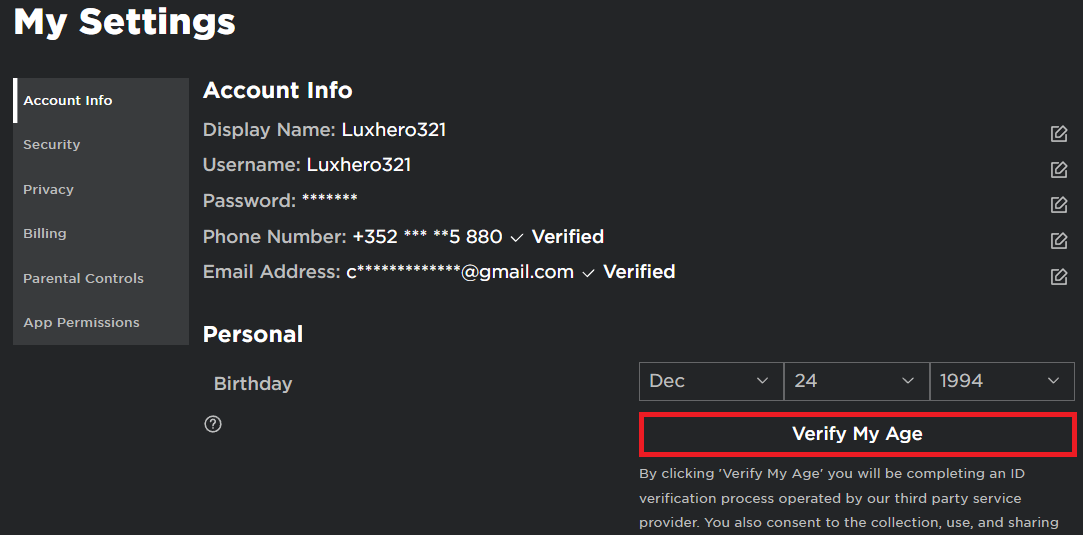
Navigating the world of Roblox is more fun and safer when your account is fully verified. For busy gamers balancing work and family, ensuring your Roblox account is verified is a crucial step towards enhanced security, improved social features, and a smoother overall experience. This comprehensive guide will walk you through how to verify your Roblox account, including email, phone number, and age verification, making sure your digital playground remains secure. Learn the simple steps to protect your account from unauthorized access, unlock exclusive features, and connect with friends safely. We'll cover common questions and troubleshooting tips, empowering you to manage your Roblox presence confidently without taking too much time away from your real-world responsibilities or precious gaming sessions. Discover why verification is essential for both peace of mind and optimizing your time in the vast Roblox universe, ensuring you stay current and secure without unnecessary hype.
What is Roblox Account Verification and Why Bother?
Roblox account verification is the process of confirming your identity or contact details, like email and phone number, with the platform. You should bother because it dramatically boosts your account's security, making it harder for unauthorized access. It also unlocks key features like Two-Step Verification and sometimes age-gated social tools like Spatial Voice, ensuring a safer and more authentic gaming experience for you.
How can I quickly verify my email on Roblox?
To quickly verify your email on Roblox, log into your account, go to 'Account Settings', and enter your email address. Click the 'Verify' button next to it. Roblox will send a link to your inbox; click that link, and your email will be verified almost instantly. Remember to check your spam folder if you don't see it immediately.
Is it important to verify my phone number for Roblox security?
Yes, verifying your phone number is highly important for Roblox security. It provides an additional layer of protection, especially for enabling Two-Step Verification (2SV). This means even if your password is compromised, attackers can't log in without the code sent to your phone, making your account much more resilient against hacking.
What are the main advantages of having a verified Roblox account?
The main advantages of a verified Roblox account include enhanced security against unauthorized access, easier account recovery if you forget your password, and access to advanced features like Two-Step Verification. Age verification specifically unlocks social functions like Spatial Voice and helps ensure you interact with age-appropriate content and communities, enriching your overall experience.
What exactly is age verification on Roblox and how do I do it?
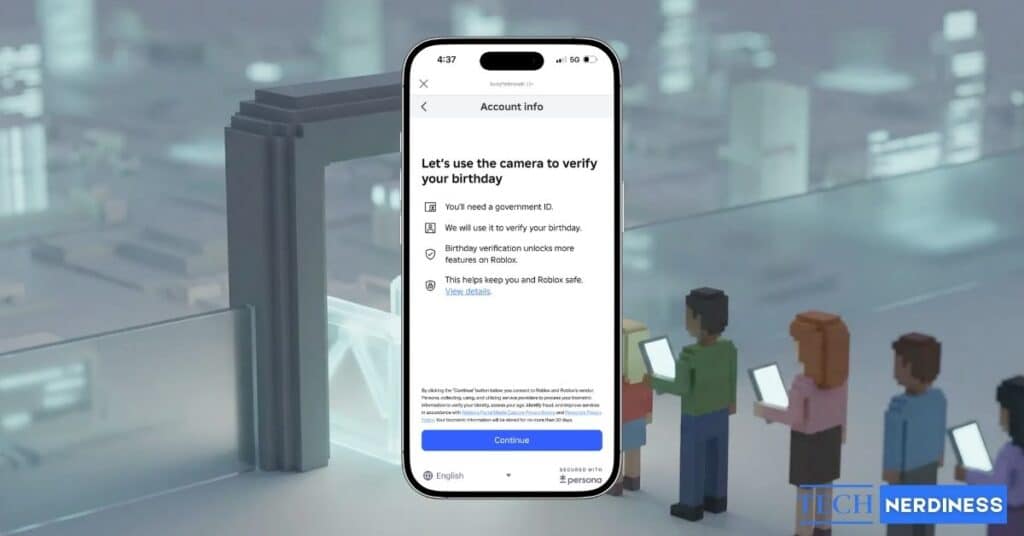
Age verification on Roblox confirms your actual age using a government-issued ID and a live selfie, processed by a secure third-party service. To do it, go to 'Account Settings', find 'Verify My Age', and follow the prompts to scan your ID and take a selfie. It unlocks features like Spatial Voice chat for a more immersive social experience while protecting privacy.
Can verifying my account help prevent scams on Roblox?
Verifying your Roblox account, especially with Two-Step Verification, significantly reduces your vulnerability to common scams like phishing or account takeovers. While it doesn't stop every scam, it makes your account much harder to compromise, providing a robust defense. A verified account signals legitimacy, deterring some malicious actors and making it easier to recover if an issue arises.
What if I don't receive the verification email or code?
If you don't receive the verification email or code, first check your spam or junk mail folders; they often end up there. Ensure you've entered the correct email address or phone number. Wait a few minutes, then try requesting the code again. If problems persist, clear your browser cache or try a different device before contacting Roblox Support for direct assistance.
Hey fellow gamers! We know how it is. You're juggling work, family, and maybe a few responsibilities in between, but that precious gaming time on platforms like Roblox is your escape, your social hub, or your creative outlet. You want to dive in, have fun, and unwind without worrying about account security or missing out on key features. That's why understanding how to verify your Roblox account is so crucial. It’s not just a technical step; it’s about peace of mind, protecting your hard-earned progress, and ensuring a seamless experience in a world where an astounding 87% of US gamers play regularly, often for 10+ hours a week, and mobile gaming dominates.
Many of us, the average 36-year-old gamer balancing life, appreciate direct solutions that save time and eliminate headaches. Think of verification as a vital upgrade to your gaming setup – like adding a faster SSD or a more comfortable chair – it just makes everything better. A verified account not only fortifies your defenses against digital threats but also opens up a richer, more connected Roblox universe. This guide is your no-nonsense, friend-to-friend walkthrough to make sure your Roblox adventures are as secure and enjoyable as they should be, helping you stay current with platform best practices without any unnecessary fuss.
Why Should I Verify My Roblox Account?
Verifying your Roblox account isn't just a suggestion; it's a fundamental security measure and a gateway to a more robust experience. In today's digital landscape, where account compromises are a constant threat, taking these simple steps can prevent significant headaches. For adult gamers who invest their limited free time into gaming, the last thing you want is to lose access to your account or have it misused. Verification strengthens your account's integrity, making it much harder for unauthorized individuals to gain entry.
Beyond security, a verified account often unlocks enhanced social features and sometimes even access to certain experiences or creator tools. It builds trust within the Roblox community, signaling that your account is legitimate. With social gaming trends soaring this month, and platforms like Roblox being central to online interaction for many, a verified account ensures you can fully participate and connect with friends securely. It's about protecting your fun and your online identity.
How Do I Verify My Email Address on Roblox?
Verifying your email address is one of the quickest and most effective ways to secure your Roblox account and enable password recovery. It's a fundamental step that every gamer should take. Here’s how you can do it:
Log In: First, sign in to your Roblox account on the website or through the app.
Access Settings: Navigate to your 'Account Settings'. On the website, this is usually found by clicking the gear icon in the top right corner. In the app, it might be under 'More' then 'Settings'.
Add or Update Email: Look for the 'Email Address' field. If you haven't added one, type in your primary email address. If an old one is there, update it to your current, secure email.
Click 'Verify': After entering your email, you'll see a 'Verify' button next to the email field. Click it.
Check Your Inbox: Roblox will send a verification email to the address you provided. Open your email client (Gmail, Outlook, etc.) and look for an email from Roblox.
Click Verification Link: Inside the email, there will be a link to verify your email. Click this link. It will usually redirect you back to the Roblox website, confirming your email is now verified.
If you don't see the email, check your spam or junk folders. Sometimes, it takes a few minutes to arrive. This simple process adds a crucial layer of protection, allowing Roblox to contact you directly regarding account activity or security alerts.
What Are the Steps to Verify My Phone Number on Roblox?
Adding and verifying your phone number provides an extra layer of security and convenience, especially for enabling Two-Step Verification (2SV). It's a smart move for any gamer who wants robust account protection. Here’s a step-by-step guide:
Log In & Go to Settings: Just like with email, log into your Roblox account and go to 'Account Settings'.
Find Phone Number Field: Scroll down to find the 'Phone Number' section. Click 'Add Phone' or 'Verify Phone'.
Enter Your Number: Input your current mobile phone number, making sure to select the correct country code.
Receive SMS Code: Roblox will send a 6-digit verification code to your phone via SMS. This usually arrives almost instantly.
Enter Code on Roblox: Go back to the Roblox settings page and enter the 6-digit code into the designated field.
Confirm Verification: Click 'Verify' or 'Confirm'. Once accepted, your phone number will be officially linked and verified with your Roblox account.
Having a verified phone number is incredibly useful for password resets and, more importantly, for setting up 2SV, which we'll discuss shortly. It’s a small effort for a significant security boost, giving you peace of mind that your account is protected even if someone manages to get your password.
Is Age Verification Necessary, and How Does It Work on Roblox?
Age verification on Roblox is becoming increasingly important, especially for unlocking certain features like Voice Chat and gaining access to age-appropriate experiences. While not strictly mandatory for all users, it significantly enhances your social and gaming experience, particularly for adult gamers. Many US gamers are embracing social features, with platforms like Discord and in-game communication being central, making accurate age verification beneficial.
Here's how Roblox age verification generally works:
Identity Verification Partner: Roblox partners with third-party identity verification services (like Persona) to securely confirm your age. This process respects your privacy and is compliant with data protection standards.
What You Need: You'll typically need a valid government-issued ID (like a driver's license, passport, or ID card) and a device with a camera (a smartphone or webcam usually works best).
The Process:
Go to your Roblox 'Account Settings'.
Look for 'Verify My Age' or a similar option under 'Personal'.
You'll be prompted to scan a QR code with your phone or click a link to start the process on your device.
The verification service will guide you to take a photo of your ID. Ensure the photo is clear and all details are legible.
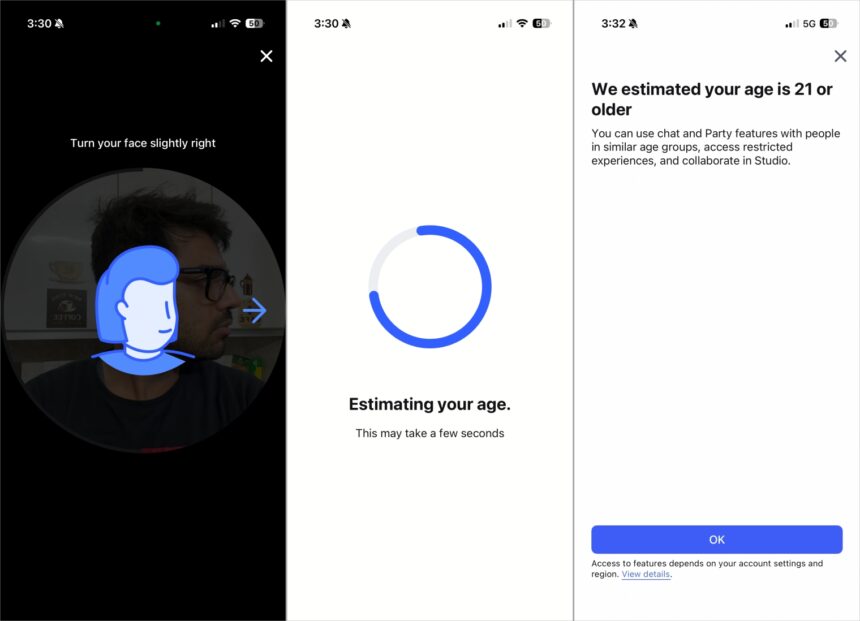
Next, you'll be asked to take a live selfie. This is used to match your face to your ID and ensure you are a real person (liveness check).
The system then processes this information. This usually takes just a few minutes.
Benefits: Once verified, you gain access to features like Spatial Voice chat, which allows for more natural communication in compatible experiences, and it helps ensure you're matched with age-appropriate content and communities. It's about creating a safer, more tailored environment for everyone, which is key for gamers who value a positive, well-regulated online space.
Roblox emphasizes that they do not store raw ID document images or selfie data; they only retain an anonymized result from the verification process to confirm age.
What Benefits Come with a Verified Roblox Account?
Verifying your Roblox account offers a suite of advantages that significantly improve your overall experience, from security to social interaction. For the busy gamer, these benefits translate into less worry and more fun.
Enhanced Security: This is the primary benefit. Email and phone verification make it incredibly difficult for unauthorized users to access your account, especially when combined with Two-Step Verification. It’s your first line of defense against phishing and account takeover attempts.
Easier Account Recovery: Forget your password? Lost access to your account? With a verified email or phone, recovering your account is a straightforward process, saving you precious gaming time and preventing frustration.
Access to Exclusive Features: Age verification, in particular, unlocks features like Spatial Voice, allowing for more immersive and natural communication within certain Roblox experiences. This is a game-changer for social gamers looking to connect more authentically.
Increased Trust and Community Engagement: A verified account, especially an age-verified one, often signifies a more committed and trustworthy player within the Roblox community. This can be beneficial for creators, event participants, or those looking to join specific groups.
Improved Safety and Moderation: For Roblox, verified accounts contribute to a safer environment by helping to deter malicious actors. While no system is perfect, verified users often face stricter consequences for violating terms of service, leading to a better experience for everyone else.
Future-Proofing: As Roblox evolves, it's likely that more features and protections will be tied to account verification. Staying ahead ensures you won't be locked out of new opportunities or security enhancements.
In essence, verification is about empowering you with control, security, and a richer, more dependable Roblox experience.
How Does Verification Improve My Roblox Security?
Roblox account verification acts as a robust shield, significantly bolstering your security posture against common digital threats. It's akin to having multiple locks on your front door instead of just one, making it much harder for intruders to gain access.
Two-Factor Authentication (2FA) Eligibility: A verified email or phone number is essential for enabling 2FA. With 2FA, even if someone has your password, they can't log in without a unique code sent to your verified contact method. This is arguably the single most important security feature you can enable on any online account.
Password Reset Protection: If your password is ever compromised or forgotten, only you (with access to your verified email or phone) can initiate and complete a password reset. This prevents unauthorized individuals from locking you out and taking over your account.
Account Activity Alerts: Roblox can use your verified email to send you important security notifications, such as login alerts from new devices, suspicious activity warnings, or changes to your account settings. This allows you to quickly detect and react to potential security breaches.
Deterrence Against Phishing: Phishing attacks often target unverified accounts, as they are easier to compromise. A verified account signals to potential attackers that it's more protected, making it a less attractive target. This doesn't make you immune, but it raises the bar significantly.
Identity Confirmation: For age verification, proving your identity helps Roblox ensure that specific, age-gated features are only accessed by eligible users, enhancing safety for everyone, especially younger players within mixed communities.
By taking these simple verification steps, you're not just following instructions; you're actively participating in the defense of your digital space, ensuring your gaming time remains stress-free and secure.
Can I Change My Verified Information Later?
Yes, you can absolutely change your verified email address or phone number on Roblox if your contact information changes. Life happens – you might switch phone providers, get a new email address, or simply want to use a more secure one. Roblox understands this and provides a straightforward process to update your details.
To change your email or phone number:
Log In and Go to Settings: Access your 'Account Settings' on the Roblox website or app.
Locate the Field: Find the 'Email Address' or 'Phone Number' field.
Edit Information: You'll usually see an 'Edit' or 'Change' button next to the existing verified information. Click this button.
Enter New Information: Input your new email address or phone number.
Re-Verify: Just like the initial verification, Roblox will send a new verification email or an SMS code to your *new* contact information. You will need to confirm this new information to complete the update.
It's crucial to ensure your contact information is always up-to-date and accessible to you. This ensures you can always recover your account or receive important security alerts without any issues. Keeping your verification details current is a continuous part of good account management.
What if I Encounter Issues During Roblox Account Verification?
It's normal to hit a snag occasionally, even with straightforward processes. If you're having trouble verifying your Roblox account, don't worry, there are common solutions for most issues. Many gamers face these small hurdles, and a little troubleshooting goes a long way.
Not Receiving Email/SMS Code:
Check Spam/Junk Folder: The most common reason. Emails from automated systems often end up there.
Verify Correct Information: Double-check that you've entered the exact email address or phone number associated with your account. A typo can prevent the code from reaching you.
Wait a Few Minutes: Sometimes, there's a slight delay in delivery. Give it 5-10 minutes before requesting another code.
Request Again: If after a few minutes you haven't received anything, try clicking the 'Resend Code' or 'Resend Email' option on Roblox.
Check Blocked Senders: Ensure that Roblox isn't blocked by your email provider or phone carrier.
Verification Link Expired: Verification links/codes often have a limited lifespan (e.g., 15-30 minutes). If it expires, simply go back to your Roblox settings and request a new one.
Age Verification Problems (ID/Selfie Issues):
Clear Lighting: Ensure you're in a well-lit area when taking photos of your ID and selfie.
Focus and Clarity: Make sure your ID photo is sharp, with no glare, and all text is readable. Your selfie should be clear and show your full face.
Matching ID: Use a government-issued ID that is current and matches your appearance as closely as possible.
Internet Connection: A stable internet connection is vital for the identity verification process to upload images without interruption.
General Glitches:
Clear Cache/Cookies: Sometimes browser data can interfere. Clear your browser's cache and cookies, then try again.
Try a Different Browser/Device: If you're using a web browser, try another one (e.g., Chrome, Firefox, Edge). If on PC, try on mobile, or vice-versa.
Roblox Server Status: Occasionally, Roblox servers might experience issues. Check reputable third-party sites like Downdetector to see if others are reporting problems.
Contact Roblox Support: If all else fails, reach out to Roblox customer support. Provide them with as much detail as possible about the issue, including screenshots if available. They are equipped to handle unique account-specific problems.
Remember, patience and systematic troubleshooting usually resolve most verification hurdles. Don't get discouraged – you'll get that account secured!
Does Roblox Offer Two-Step Verification (2SV)?
Absolutely, and it's one of the best security features you can enable! Roblox strongly encourages all users, especially adult gamers who value their digital assets and time, to activate Two-Step Verification (2SV), also known as two-factor authentication. This feature adds a critical layer of security to your account. Even if someone manages to guess or steal your password, they still won't be able to log in without the additional code generated by 2SV.
How 2SV Works:
Setup Requirement: You must have a verified email address on your Roblox account to enable 2SV. This is why email verification is a foundational step.
Activation:
Go to your 'Account Settings' on Roblox.
Scroll down to the 'Security' tab.
Toggle on '2 Step Verification'.
Roblox will send a verification code to your verified email address.
Enter this code on the Roblox page to confirm and activate 2SV.
Login Process with 2SV:
You enter your username and password as usual.
Roblox then prompts you for a 6-digit verification code.
A new, unique code is sent to your verified email address (or sometimes linked phone number, depending on your setup).
You retrieve this code from your email/phone and enter it into the Roblox login screen.
Only after entering both your password and the correct 2SV code can you access your account.
Recovery Codes: During 2SV setup, Roblox often provides a set of recovery codes. It's vital to save these in a safe, offline place (like a password manager or written down). These codes can be used to log in if you lose access to your verified email or phone.
Enabling 2SV is a non-negotiable step for optimal security. It significantly reduces the risk of account takeovers, giving you peace of mind that your Roblox creations, Robux, and connections are well-protected.
How Can Verification Help with Social Features on Roblox?
For many adult gamers, Roblox isn't just about solo play; it's a vibrant social hub. Verification plays a significant role in enhancing these social features, making interactions safer, more authentic, and more enjoyable, especially as social gaming continues to trend this month.
Access to Spatial Voice: One of the most impactful social features tied to age verification is Spatial Voice. This allows for proximity-based voice chat in supported experiences, creating a much more immersive and natural communication environment. For those looking to connect with friends or new players in real-time within games, this feature is invaluable.
Trust in Community Interaction: A verified account, particularly one with age verification, often fosters a greater sense of trust among players. When you know you're interacting with a verified individual, it reduces concerns about interacting with potential bad actors or imposters, leading to more genuine connections.
Safer Group and Experience Participation: Some groups, experiences, or events on Roblox may require or recommend verified accounts for participation to maintain a higher standard of community. This helps filter out spam bots or malicious accounts, creating a more pleasant environment for everyone.
Reduced Harassment and Spam: While verification isn't a silver bullet, it contributes to a platform where malicious behavior is easier to trace and penalize. This indirectly leads to a reduction in general harassment and spam, improving the overall quality of social interactions.
Personalized Recommendations and Connections: As Roblox continues to refine its social algorithms, verified data (like age) could potentially lead to more accurate recommendations for friends, groups, and experiences that align with your interests and peer group, making it easier to find your tribe.
Ultimately, verification helps cultivate a more mature, secure, and authentic social ecosystem on Roblox, allowing you to fully engage and enjoy the collaborative and community-driven aspects of the platform without undue worry.
Conclusion
So there you have it – a clear path to understanding and completing your Roblox account verification. It might seem like a small detail, but in the fast-paced, ever-evolving world of online gaming, it's a monumental step for your account's security, functionality, and overall enjoyment. For us gamers who expertly juggle life's demands with our passion for play, taking a few moments to verify your email, phone, and potentially your age means less stress about account compromise and more time for what truly matters: having fun, building skills, and connecting with friends. With over 60% of US gamers regularly engaging, and mobile continuing its dominance, keeping your digital identity secure and verified is more important than ever.
You've now got the knowledge to fortify your Roblox presence, unlock enhanced features, and enjoy a safer, more connected experience. Don't let a simple oversight compromise your valuable gaming time. What’s your biggest gaming challenge when it comes to account security or managing your online presence? Comment below!
FAQ Section
Q: Do I need to verify my age to play Roblox?
A: No, age verification isn't required to simply play Roblox. However, verifying your age (usually 13+) unlocks features like Spatial Voice chat and ensures you access age-appropriate content, enhancing social aspects for many gamers.
Q: How long does Roblox email verification take?
A: Roblox email verification is typically very quick, often taking less than a minute. The delay, if any, usually comes from your email provider's delivery time, so check your spam folder if it doesn't appear immediately.
Q: Is it safe to give Roblox my phone number?
A: Yes, it is safe to provide your phone number to Roblox for verification purposes. It adds a crucial security layer, enabling Two-Step Verification and making account recovery easier, without Roblox publicly displaying your number.
Q: Can I have multiple Roblox accounts with the same verified email?
A: No, each Roblox account requires a unique, verified email address. If you try to use an email already linked to another account, Roblox will prompt you to use a different one or offer to merge information if applicable.
Q: What are recovery codes for in Roblox 2SV?
A: Recovery codes are unique, single-use codes provided when you set up Two-Step Verification. They act as a backup to log into your account if you lose access to your verified email or phone, so keep them secure offline.
Q: Does verifying my Roblox account prevent all hacking attempts?
A: While verifying your Roblox account significantly enhances security, especially with 2SV, no system is entirely hacker-proof. It drastically reduces risk but always combine it with strong, unique passwords and vigilance against phishing scams.
Enhance Roblox security with email and phone verification. Unlock social features and exclusive content. Understand Roblox age verification process. Prevent unauthorized access and account compromises. Step-by-step guide for hassle-free verification. Optimize your Roblox experience for safety and community.
35#1 Gallery how to verify roblox account


How To Verify Your Roblox Account YouTube . How To Verify Roblox Account Item Level Gaming Screenshot 20230626 004143 YouTube . Option To Verify Age With Selfie Or ID Verify With ID . How To Verify Id On Roblox YouTube . Roblox 2026 How Can Players Get Verified 14414001 13
#2 Gallery how to verify roblox account


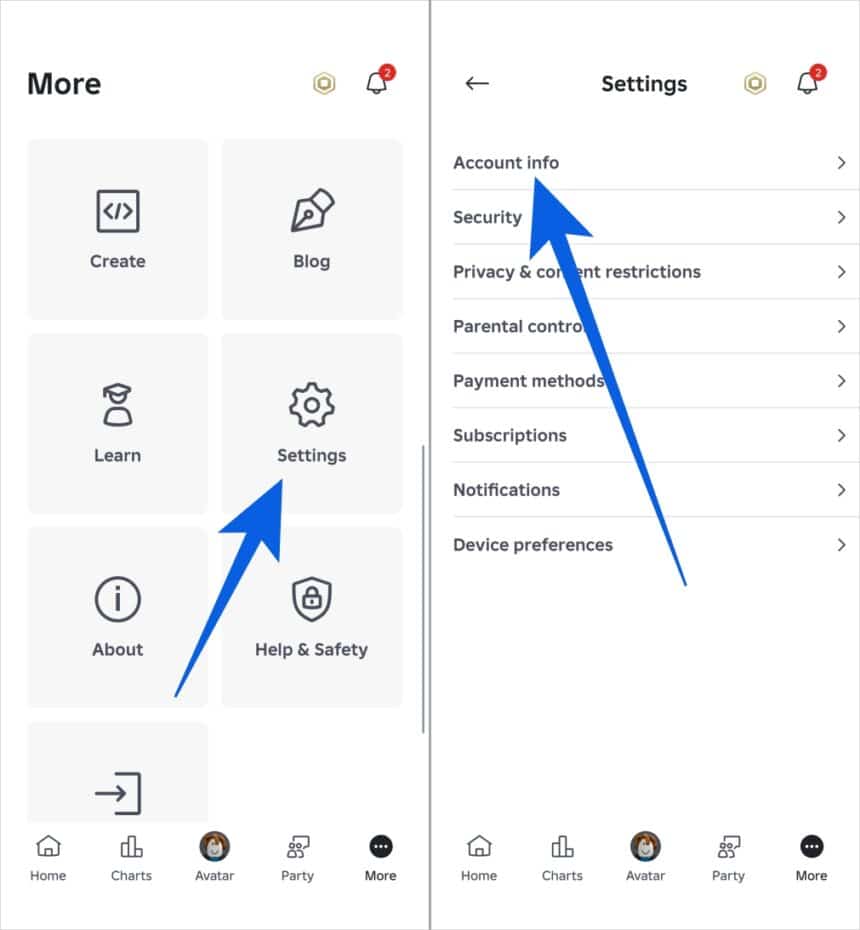
How To Verify Your Roblox Account Easy Guide YouTube . How To Verify Your Roblox Account YouTube . Enter The 6 Digit Code Then Click The Continue Button Verify Phone Dialog . How To Verify Your Age And ID On Roblox In 2026 Guide Tech Nerdiness Roblox ID . How To Verify Your Age And ID On Roblox In 2026 Guide Tech Nerdiness Go To Settings And Tap Account Info In Roblox App 860x930
#3 Gallery how to verify roblox account


Lost Roblox Password How To Find Yours In 2026 . Roblox 2026 How Can Players Get Verified 2 Verify Age. HOW TO VERIFY YOUR ROBLOX ACCOUNT YouTube . How To Add 2 Step Roblox 2026 UPDATED YouTube . Roblox 2026 How Can Players Get Verified V4 460px 14414001 5
#4 Gallery how to verify roblox account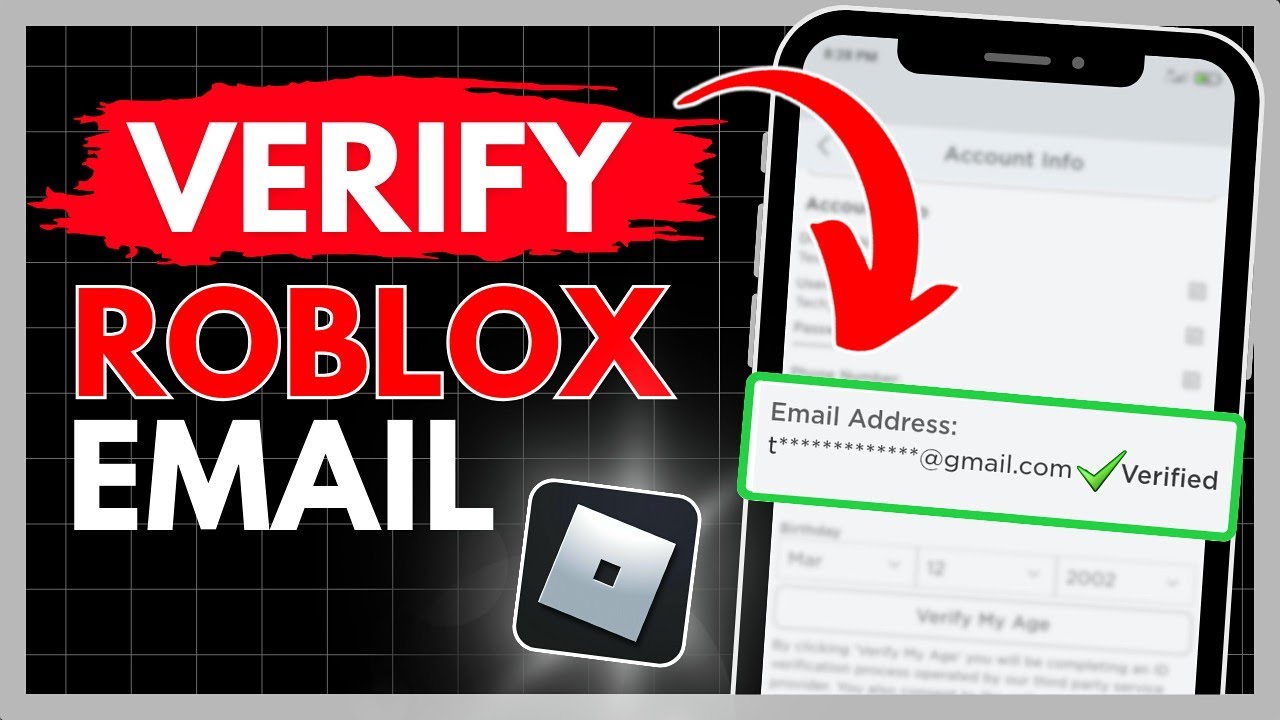


How To Verify Your Roblox Account Email EASY 2023 YouTube . How To Find Your Roblox Password For 2026 . Lost Roblox Password How To Find Yours In 2026 . Lost Roblox Password How To Find Yours In 2026 . How To Verify Your Age On Roblox In 2022 Easy Guide Beebom Roblox Age Box
#5 Gallery how to verify roblox account


Roblox 2026 How Can Players Get Verified V4 460px 14414001 4 . Roblox 2026 How Can Players Get Verified . How To Verify Your Roblox Account YouTube . How To Verify A Roblox Account YouTube . How To Verify My Roblox Account Shola Hey Facebook Media
#6 Gallery how to verify roblox account


How To Create A Roblox Account In 2026 What You Need Roblox Login How To Create A New Account . How To Enable 2 Factor On Roblox Secure Your Account In . How To Verify Your Age And ID On Roblox In 2026 Guide Tech Nerdiness How To Verify Your Age And ID On Roblox 1024x536 . How To Unlock Chat In Roblox 2026 How To Verify Age In Roblox Mobile . How To Verify Your Age And ID On Roblox In 2026 Guide Tech Nerdiness Tap Continue To Open The Camera Hold Still Then Slowly Turn Your Head From Left To Right 860x621
#7 Gallery how to verify roblox account


How To CHECK HOW OLD Your Roblox Account Is FULL GUIDE YouTube . How To Verify Roblox Account Item Level Gaming Screenshot 20230625 234828 Chrome . Option To Verify Age With Selfie Or ID Verify Birthday . How To Verify Your Roblox Account YouTube . How To Verify Your Roblox Account IOS YouTube Hqdefault